Motivation
Biplots can contain a lot of information. To dig into that information it would help if one could interact with the plot. Thus, we want to plot the information in a modern Javascript plotting standard.
Static biplot
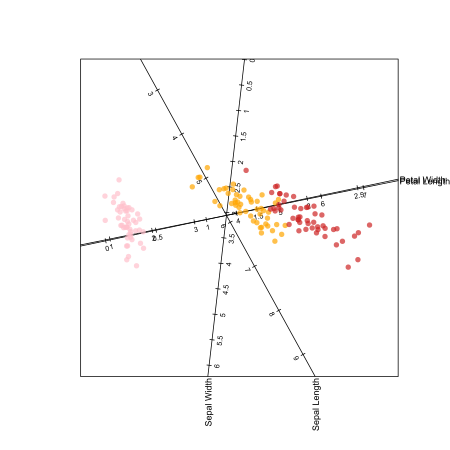
Let us begin by illustrating the classic iris data set with biplotEZ .
Code
# Normally one might hide the setup R chunk, but here I am deliberately showing # that I'm using SVG for static plots but best online quality library (knitr)<- 600 $ set (dev = 'svg' , fig.ext = 'svg' , echo = TRUE , fig.width = fig_size/ 96 , fig.height = fig_size/ 96 )
Code
library (biplotEZ) |> suppressPackageStartupMessages ()
Code
<- iris |> setNames (names (iris) |> stringr:: str_replace_all (" \\ ." , " " ))<- biplot (iris) |> PCA (group.aes = iris$ Species) |> axes (col = "black" ) |> samples (col = c ("pink" ,"orange" ,"firebrick3" ), opacity = 0.7 ) |> plot ()
Colourful and clear 😊, but not interactive.
Interactive version
Let’s load echarts4r and try to plot the information using it. See this nice video introduction for more information .
Code
library (echarts4r) |> suppressPackageStartupMessages ()
The first step is to prepare the data correctly. In this case we will use the output from biplotEZ as a starting point.
Points
Code
# Creating the point data frame is easy: <- data.frame (x = bp$ Z[,1 ], y = bp$ Z[,2 ], Species = iris$ Species)# As is plotting it: |> group_by (Species) |> e_charts (x = x, width = fig_size, height = fig_size) |> e_scatter (serie = y, symbol_size = 5 ) |> e_toolbox_feature ("dataZoom" ) |> e_tooltip (axisPointer = list (type = "cross"
Try using the zoom tool to zoom in.
Axes
Those fancy axes are not so easy. Let’s reconstruct them in a new way:
Code
<- function (bp) {<- bp$ ax.one.unit[,1 ]<- bp$ ax.one.unit[,2 ]<- ceiling (bp$ axes$ ticks/ 2 )<- data.frame (X = seq_along (xu) |> sapply (\(i) {seq (- tkz[i]* abs (xu[i]), tkz[i]* abs (xu[i]), abs (xu[i]))* sign (xu[i])|> c (),Y = seq_along (yu) |> sapply (\(i) {seq (- tkz[i]* abs (yu[i]), tkz[i]* abs (yu[i]), abs (yu[i]))* sign (yu[i])|> c (),Variable = rep (bp$ axes$ names, tkz* 2 + 1 ),VarNum = rep (seq_along (bp$ axes$ names), tkz* 2 + 1 )<- as.matrix (ax_df[, 1 : 2 ]) %*% t (bp$ Lmat[, 1 : 2 ])$ Projection <- seq_len (nrow (ax_df)) |> sapply (\(i) {$ VarNum[i]] * bp$ sd[ax_df$ VarNum[i]] + bp$ means[ax_df$ VarNum[i]]|> round (1 )<- bp |> create_ax_df () |> group_by (Variable)
Then we draw a plot of the axes:
Code
|> e_charts (x = X, width = fig_size, height = fig_size) |> e_line (serie = Y) |> e_scatter (serie = Y)
Combined
We can combine it with the scatter plot:
Code
|> group_by (Species) |> e_charts (x = x, width = fig_size, height = fig_size) |> e_scatter (serie = y, symbol_size = 5 ) |> e_data (v, x = X) |> e_line (serie = Y) |> e_scatter (serie = Y) |> e_toolbox_feature ("dataZoom" ) |> e_tooltip (axisPointer = list (type = "cross"
The only problem is that our tooltips don’t convey any useful information 😢.
Final plot
Let’s combine the new code into a function that can be added to the biplotEZ chain.
Code
<- function (bp, width = 600 , height = 500 ) {library (echarts4r)<- data.frame (x = bp$ Z[,1 ], y = bp$ Z[,2 ], g = bp$ Xcat[[1 ]]) |> group_by (g)<- function (bp) {<- bp$ ax.one.unit[,1 ]<- bp$ ax.one.unit[,2 ]<- ceiling (rep (5 , length (xu))/ 2 )<- bp$ means |> names ()<- data.frame (X = seq_along (xu) |> sapply (\(i) {seq (- tkz[i]* abs (xu[i]), tkz[i]* abs (xu[i]), abs (xu[i]))* sign (xu[i])|> c (),Y = seq_along (yu) |> sapply (\(i) {seq (- tkz[i]* abs (yu[i]), tkz[i]* abs (yu[i]), abs (yu[i]))* sign (yu[i])|> c (),Variable = rep (ax_nms, tkz* 2 + 1 ),VarNum = rep (seq_along (ax_nms), tkz* 2 + 1 )<- as.matrix (ax_df[, 1 : 2 ]) %*% t (bp$ Lmat[, 1 : 2 ])$ Projection <- seq_len (nrow (ax_df)) |> sapply (\(i) {$ VarNum[i]] * (bp$ sd[ax_df$ VarNum[i]]^ bp$ scaled) + $ means[ax_df$ VarNum[i]]* bp$ center)|> round (1 )<- bp |> create_ax_df () |> group_by (Variable)<- function (df, digits = 3 ) {<- names (df)<- seq_len (ncol (df)) |> lapply (\(j) {if (is.numeric (df[[j]])) {x <- df[[j]] |> round (digits = digits)} else {x <- df[[j]]}paste0 (nms[j], ": " , x)|> list2DF ()seq_len (nrow (d)) |> sapply (\(i) {paste0 (d[i,] |> unlist (), collapse = "<br>" )$ tooltip <- bp$ raw.X |> create_tooltip ()|> e_charts (x = x, width = width* 1.25 , height = height) |> e_scatter (serie = y, bind = tooltip, symbol_size = 5 ) |> e_data (v, x = X) |> e_line (serie = Y) |> e_scatter (serie = Y, bind = Projection, label = list (show = TRUE , formatter = "{b}" , offset = c (10 ,10 ))) |> e_toolbox_feature ("dataZoom" ) |> e_tooltip (formatter = htmlwidgets:: JS (" function(params) { return params.name; } " )|> e_grid (width = "67%" , right = "20%" ) |> e_legend (orient = "vertical" , # vertical layout right = "1%" , # position from the right top = "middle" # vertically centered
And draw the plot clean:
Code
<- iris |> setNames (names (iris) |> stringr:: str_replace_all (" \\ ." , " " ))|> biplotEZ:: biplot (scale = TRUE ) |> :: PCA (group.aes = iris$ Species) |> e_biplotEZ ()